refresh
Help page for codify refresh
codify refresh <type> [type...]
[--json]
[--debug]
[-o plain|default|debug|json]
[-s]
[-p <value>]
Use codify refresh to reconcile your existing codify.jsonc file with changes made directly on your system outside of Codify.
The refresh command scans your system for changes to resources already defined in your codify.jsonc file and updates the
file to reflect the current state. This is useful when you've manually installed packages, changed configurations,
or made other modifications without using Codify.
Use Cases
- Syncing manual changes: You installed additional homebrew formulae or changed your global Node version
manually and want to update your
codify.jsoncto reflect these changes. - Keeping configs up to date: Team members made changes to their setup outside of Codify and need to update their configuration files to stay in sync.
- Drift detection: You want to ensure your
codify.jsoncaccurately represents what's currently installed on your system.
How it Works
When you run codify refresh in a directory containing a codify.jsonc file:
- Codify reads your existing configuration file
- For each resource defined in the file, it scans your system to detect the current state
- It calculates a diff showing what has changed
- You're prompted to review and apply the changes to your
codify.jsoncfile
The command will preserve your file's existing formatting, spacing, and structure while inserting the updates.
Diff Preview
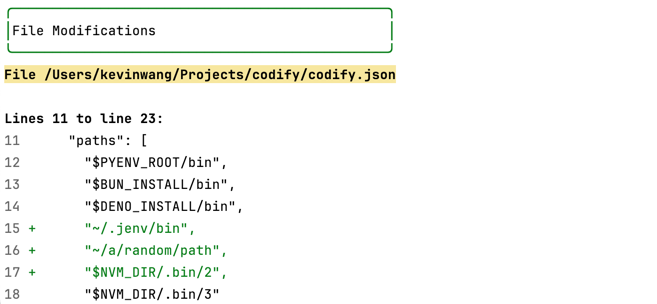
Before making any changes, Codify shows you a diff of what will be updated in your configuration file. You can review these changes and choose whether to proceed.
Refresh vs Import
Understanding the difference between these two commands:
codify refresh: Updates resources that already exist in yourcodify.jsoncfile with new changes from your systemcodify import: Generates new resource configs for tools and settings not yet defined in yourcodify.jsoncfile
Example scenario:
- Your
codify.jsonccontains a homebrew resource with["jq", "git"] - You manually install
dockervia homebrew - Run
codify refresh→ Updates the existing homebrew resource to include"docker" - You want to add your
nvmsetup which isn't in your config yet - Run
codify import nvm→ Adds a new nvm resource block to your file
Arguments
<type>
The type id of the resources to refresh. Multiple ids separated by spaces can be specified. Wildcards * and ? can be used to match multiple types at once.
Special behavior:
- With types specified: Refresh only those specific resource types
- No types specified: Refreshes the entire file
Examples:
codify refresh homebrew nvm vscode     # Refresh specific resources
codify refresh asdf*                   # Refresh all resources starting with 'asdf'
codify refresh                         # Refresh all resources in the file
Options
Path: --path -p
Specify the path for the codify.jsonc file. This parameter accepts both relative and absolute paths.
Output mode: --output -o
Specify the CLI output mode. Options: [default, plain, json]. The output mode controls what gets
printed to the console.
Debug output mode: --debug
A flag to enable debug mode. In debug mode, the debug output will be turned on and the DEBUG=codify flag
will be passed to all plugins. Additional and verbose logging will be printed. Useful for debugging
any issues.
Examples
Basic refresh
Update your existing config with system changes:
codify refreshRefresh with custom path
Refresh a config file in a different location:
codify refresh -p ~/team-configs/codify.jsoncRefresh with JSON output
Get machine-readable output for automation:
codify refresh -o jsonDebug mode refresh
Troubleshoot issues with verbose logging:
codify refresh --debugCommon Workflows
Workflow 1: After Manual Installation
# You manually installed packages outside of Codify
brew install wget
npm install -g typescript

# Update your codify.jsonc to reflect these changes
codify refresh

# Review the diff and apply changes
Workflow 2: Configuration Audit
# Periodically check if your config matches reality
codify refresh

# If changes are detected, review and decide whether to:
# 1. Apply them to your codify.jsonc (keep the manual changes)
# 2. Run codify apply to revert to your declared config (undo manual changes)
Tips
- Run
codify refreshregularly to keep your configuration file in sync with your system - Combine with
codify import <type>to add new resources and refresh existing ones in your workflow - The refresh command only modifies your
codify.jsoncfile—it doesn't change anything on your system